Our Kubernetes cluster lives on bare-metal nodes. It costs less, we get more control over the infrastructure, and we can tune it for our own workloads. Rolling our own on bare-metal nodes means we are not locked in to any cloud provider. But it also means there is no cloud provider underneath to hand us managed disks and one-click volume snapshots, so we have to build that part ourselves, storage and backups included. This post walks through how we set up backups.
All the code referenced here lives in the sinanmohd/infra repo.
Table of contents
Open Table of contents
Benchmark setup
We wrote a script that runs fio against throwaway volumes on a fresh server with nothing else running on it. It covers ext4 and XFS on LVM with thick and thin snapshots, and btrfs on a thick LV and ZFS on both a thick LV and the raw drives, using their native snapshots. Each case ran once. native-zfs ran afterwards on the same server, reinstalled with the pool directly on the drives.
| Machine | Hetzner AX52 |
|---|---|
| CPU | AMD Ryzen 7 7700 (8 cores, 16 threads) |
| Disks | 2x Samsung PM9A1 1 TB (MZVL21T0HCLR) |
| OS | NixOS 26.11 (Zokor) |
| Kernel | 6.18.59 |
| LVM | 2.03.41 |
| ZFS | OpenZFS 2.4.4 |
| fio | 3.42, libaio, direct=1 |
We tested thirteen cases.
- lvmthick-raw / lvmthin-raw, the LV itself with no filesystem on top
- lvmthick-ext4 / lvmthick-xfs, ext4 or XFS on a thick LV, which is what our PVs ran on before
- lvmthin-ext4 / lvmthin-xfs, the same on a thin LV
- lvmthinzero-raw / lvmthinzero-ext4 / lvmthinzero-xfs, the three thin cases again with the pool’s zeroing on. The other thin cases have it off
- lvmthick-btrfs / lvmthick-btrfs-nodatacow, btrfs on a thick LV, either
with default options or mounted with
nodatacow, which also turns off checksums and compression for the data - lvmthick-zfs, a pool on a thick LV with
recordsize=16kand lz4, andprimarycache=metadataso that ZFS’s RAM cache does not serve reads the other cases have to take from disk - native-zfs, a dataset with the same settings on a pool striped straight across the two NVMe drives, with no mdadm or LVM underneath. The pool also holds the server’s root filesystem
On a filesystem the tests run against a 16 GiB file that is allocated but never written, so the first pass still writes into new space. The page cache is dropped before every test. The snapshot is an LVM snapshot of the LV (with the filesystem frozen while it is taken), a read-only btrfs subvolume snapshot, or a ZFS snapshot.
Each case runs the same tests in this order.
| # | Test | fio | What it measures |
|---|---|---|---|
| 1 | randwrite-first | 4k randwrite, qd32 x 4 jobs, one full pass | writes into unallocated space |
| 2 | randwrite-rewrite | same pass again | writes into already-allocated space |
| 3 | fsync16k | 16k randwrite, qd1, fdatasync every IO | database-style commit latency |
| 4 | randread | 4k randread, qd32 x 4 jobs | read path through the mapping |
| 5 | seqwrite | 1M write, qd8 | streaming throughput |
| x1 | randrw8k | 8k random, 70% reads, qd16 x 4 jobs | Postgres-style mixed IO |
| x2 | syncwrite | 4k randwrite, O_SYNC, qd1 x 8 jobs | parallel committers |
| x3 | walsync | 16k sequential writes, fdatasync every IO | WAL-style appends (filesystems only) |
| 6 | fsync16k-snap | test 3 after taking a snapshot | commits while a backup snapshot exists |
| 7 | randwrite-snap | test 1 after test 6, snapshot still there | a full pass that breaks every shared block |
| x4 | syncwrite-snap | x2 after test 7 | parallel committers after test 7 |
By the time the snapshot is taken every block of the region has been written, so every block is shared with it, and the first write to each one has to copy it (a COW exception on thick, a chunk break on thin). Tests 6 and 7 are what our applications go through while a snapshot exists. x4 runs after the full pass of test 7 has already broken all sharing, so it measures much the same thing as x2, and we leave it out of the charts.
Results
These charts compare ext4 and XFS on thick and thin LVs with btrfs and ZFS, one test at a time, with the hatched bars showing thin with zeroing on. The first eight tests ran without a snapshot.
randwrite-first
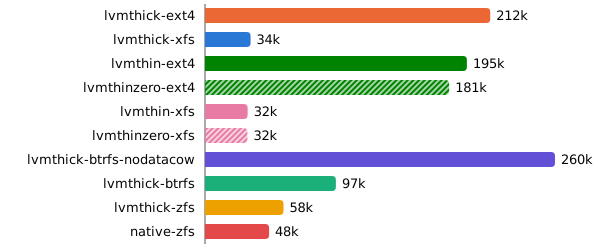
XFS converts an unwritten extent on almost every write into the preallocated file, which is why it lags so far behind ext4 here. On this pass the filesystem’s own allocation is the bottleneck, which hides the cost of thin. It is also the only pass where zeroing costs anything, since the pool wipes a chunk only the first time it is allocated. btrfs and ZFS pay for copy-on-write and checksums on every write.
randwrite-rewrite
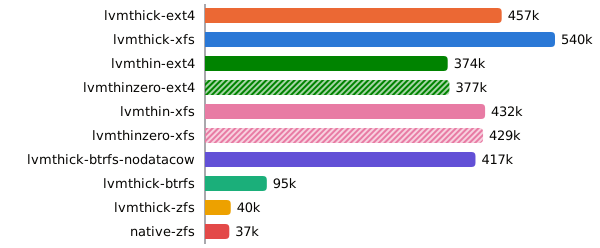
With the extents already converted, XFS no longer pays for them. A thin LV has to look up the chunk mapping on every IO. btrfs allocates new space on every write anyway, so the second pass is no easier for it. On ZFS each 4k write has to read and rewrite the 16k record it lands in.
randread
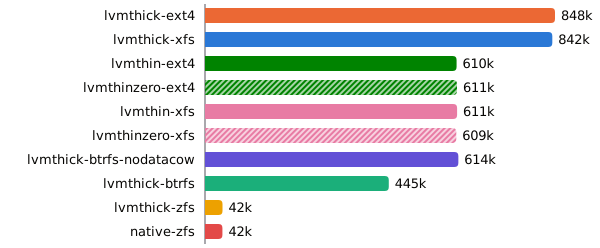
Reads on a thin LV go through the same chunk mapping. ZFS has
primarycache=metadata, so every read goes to the drives, and each 4k read
fetches and checksums a whole 16k record.
seqwrite
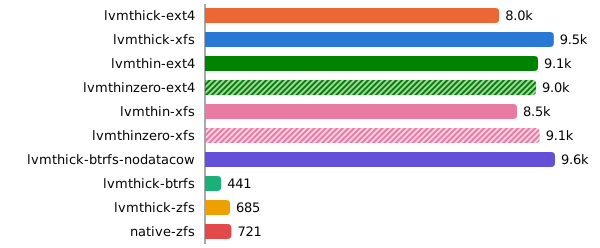
The drives’ throughput sometimes dropped for part of this test and the next, whichever layer was on top, so small gaps between cases here are noise.
randrw8k
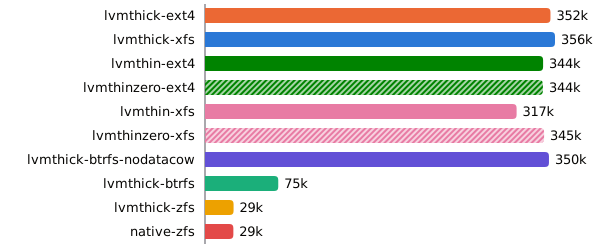
Mixed IO combines the costs of the random reads and writes above.
fsync16k
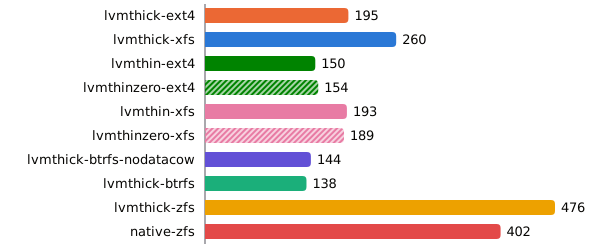
fdatasync commits per second.All of the commit tests are bound by the drive’s flush. The PM9A1 is a client drive without power-loss protection, so a flush has to actually reach the NAND. A raw LV needs one flush per commit, while ext4 and XFS also commit their journal. On thin, commits only slow down once a filesystem is on top, and we have not dug into why.
ZFS only has to write the change to its intent log. The write itself lands in memory, and ZFS only puts it in its final place in the next batch of writes, a few seconds later. So a commit costs one small log write and one flush, close to what a raw LV pays. The price is that without a separate log device, every committed block is written to the same drives twice, once to the intent log and once more in that batch.
syncwrite
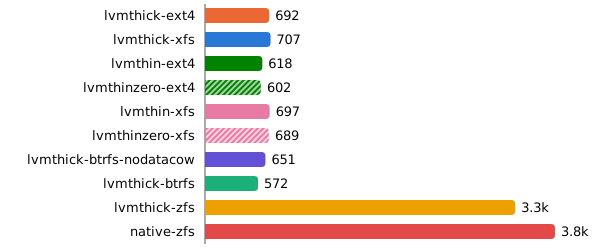
O_SYNC writers.On ZFS, parallel committers can share a single log write and flush.
walsync
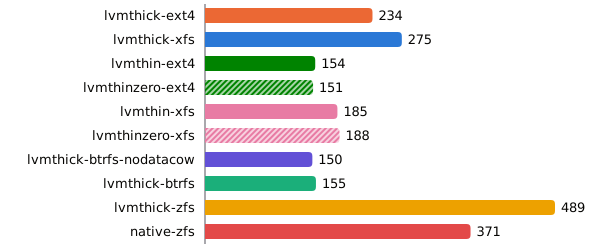
fdatasync after each.Appends behave like the single-threaded commits. ZFS with the pool straight on the drives behaves the same as on mdadm and LVM, so those are not what holds it back.
fsync16k-snap
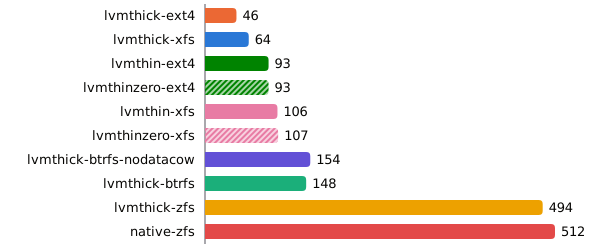
fdatasync commits with a snapshot present.ZFS never overwrites a block in place, so a snapshot only decides whether an old block is freed or kept, and adds no copy to the write path. btrfs is copy-on-write too. On a thick LV the write copies the old block before it completes. On a thin LV the write stays fast and the flush grows instead, likely the pool committing metadata for the chunks it just broke.
randwrite-snap
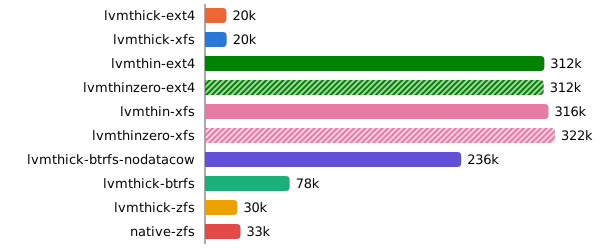
On a thick LV every first write to a block has to copy the original into the COW store and update the exception table before it can complete. Thin breaks sharing once per 512 KiB chunk in the pool instead. btrfs-nodatacow has to copy on write once per shared extent.
That makes ZFS a strong fit for commit-heavy databases, but it gives up an order of magnitude on everything else. btrfs-nodatacow keeps up with thin LVM only by turning off what btrfs is for.
Thick of it
We decided to go with LVM thin when we need local snapshots, and LVM thick when we use application-specific backups, mostly for databases.
Our HA PVs also sit on top of LVM, but they are served over NVMe-oF and use higher-level snapshots instead of LVM snapshots.
- LVM thin outperforms btrfs and ZFS in most of our tests. And it gives us cheap snapshots, the one feature we really need.
- Thin snapshots are O(1) to take and reserve nothing, where a thick one reserves the volume’s full size by default.
- While a backup is running, thin with a filesystem on top is about 16x faster on random writes than thick and does 1.7 to 2x the commits, and our apps keep writing during every backup.
- In exchange, without a snapshot, we lose up to 28% of random IOPS, at rates we never reach, and up to 34% on commits.
For the thin pool we went with 512 KiB chunks, which match the mdadm chunk size, and kept zeroing on. Zeroing only costs anything when a chunk is first allocated. On the first random-write pass it cut lvmthin-raw from 622k to about 502k IOPS and lvmthin-ext4 by 7%, left lvmthin-xfs unchanged, and every other test stayed within run-to-run noise. Without it, a newly allocated chunk is not wiped, so a partial write leaves whatever the previous owner of those blocks wrote readable in the rest of the chunk, and our PVs belong to unrelated apps.
The pool is declared in our NixOS disko config alongside the rest of the volume group.
disko.devices.lvm_vg.vg1 = {
  type = "lvm_vg";
  lvs.vg1_thinpool = {
    size = "512G";
    lvm_type = "thin-pool";
    extraArgs = [ "--chunksize" "512k" "--zero" "y" ];
  };
};
The plan
- OpenEBS LocalPV LVM provides the PVs, as plain LVs carved out of a volume group on each node.
- Velero takes CSI snapshots of those PVs, databases excluded, and, with CSI snapshot data movement, uploads the snapshot contents to an object store.
- Databases are excluded from Velero and use application-specific streaming or continuous logical backups instead. That keeps backups smaller, which matters most for S3 and ClickHouse, and as up to date as possible, which matters most for Postgres.
- A transparent S3 encryption gateway sits in front of Backblaze, and encrypts all the content before it is pushed there.
- The object store is Backblaze B2, through its S3-compatible API, so the backups live off the cluster and off Hetzner.
What we keep out of Velero
Velero backs up most of the cluster. Applications like ClickHouse and SeaweedFS are backed up with their own tooling instead. They hold by far the largest datasets in the cluster, and they can grow insanely big, since analytics tables in ClickHouse and object storage in SeaweedFS, which also hosts our OCI registry, only ever accumulate. Both replicate their data inside the cluster too, so a Velero backup would upload every replica of the same data and multiply an already huge dataset in B2.
apiVersion: velero.io/v1
kind: Schedule
metadata:
  name: daily
spec:
  schedule: 0 3 * * *
  template:
    excludedNamespaces:
      - clickhouse
      - seaweedfs
      - postgres
    includedNamespaces:
      - "*"
    includeClusterResources: true
    includedResources:
      - "*"
    defaultVolumesToFsBackup: false
    snapshotMoveData: true
    snapshotVolumes: true
    ttl: 168h0m0s
How databases are handled
Our Postgres setup uses CloudNativePG, and we do backups using the Barman Cloud plugin. It archives every WAL segment to the object store as soon as the segment is complete, and takes periodic base backups on top. A restore replays the WAL over the nearest base backup, so we can recover to any point in time, not only to the last backup.
SeaweedFS is backed up with weed filer.backup. It follows the filer’s
metadata log and copies each file to the backup sink as it is created or
changed, so the backup trails the live data by seconds.
Our Altinity ClickHouse setup is backed up with clickhouse-backup. ClickHouse never changes a data part once it is written, so the tool freezes the tables, which hardlinks their current parts without copying anything, and uploads those. Incremental backups only upload the parts the previous backup does not have, which keeps the ever-growing analytics tables cheap to back up.
Why not Kopia file system backup
Velero can also back up volumes without snapshots, through its file system backup, which runs Kopia against the live volume mounted in the pod. It works on any storage, but the result is not a consistent state of the volume. Kopia copies each file at a different moment while the app keeps writing, so Postgres would get data files from different points in time, out of sync with the WAL. A snapshot freezes the whole volume at one instant, so restoring it is like booting after a power cut, which Postgres knows how to recover from.
Kopia is still involved, since the data mover uses it to upload snapshot contents to B2, but there it reads from a frozen snapshot.